

Introduction
Are you still managing your infrastructure assets using two-dimensional drawings? If you are, you are not alone and are also missing out on real operational value. The field of infrastructure lifecycle management has slowly but surely evolved from drawings to full-fledged models that track an asset from its very creation to its eventual destruction. No longer is infrastructure designed, but rather modeled, managed, and controlled for its entire lifecycle through Building Information Modeling (BIM) and digital twins.
The divide between owners, engineers, and consultants using static CAD files to store asset data has become costly. The absence of handover data, duplication of effort, and reactive maintenance all arise from a single issue – design data that ceases to be updated once the project is considered “completed.” In this blog, we cover the meaning of infrastructure lifecycle management in today’s world, the process of converting CAD to BIM, and how companies are turning their static 2D CAD assets into dynamic BIM digital twins.
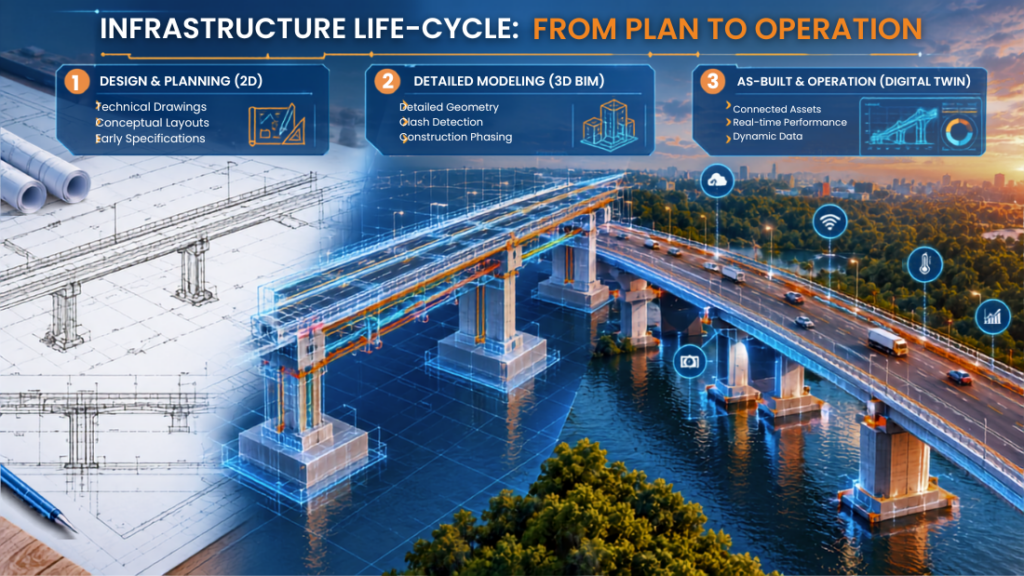
What Is Infrastructure Lifecycle Management, and Why 2D CAD Falls Short
Infrastructure lifecycle management is the practice of planning, designing, building, operating, and eventually retiring an asset using one continuous stream of information rather than a series of disconnected handoffs. It spans six recognizable phases: concept, design, construction, commissioning, operations and maintenance, and eventual upgrade or decommissioning.
The Limits of Traditional CAD Asset Data
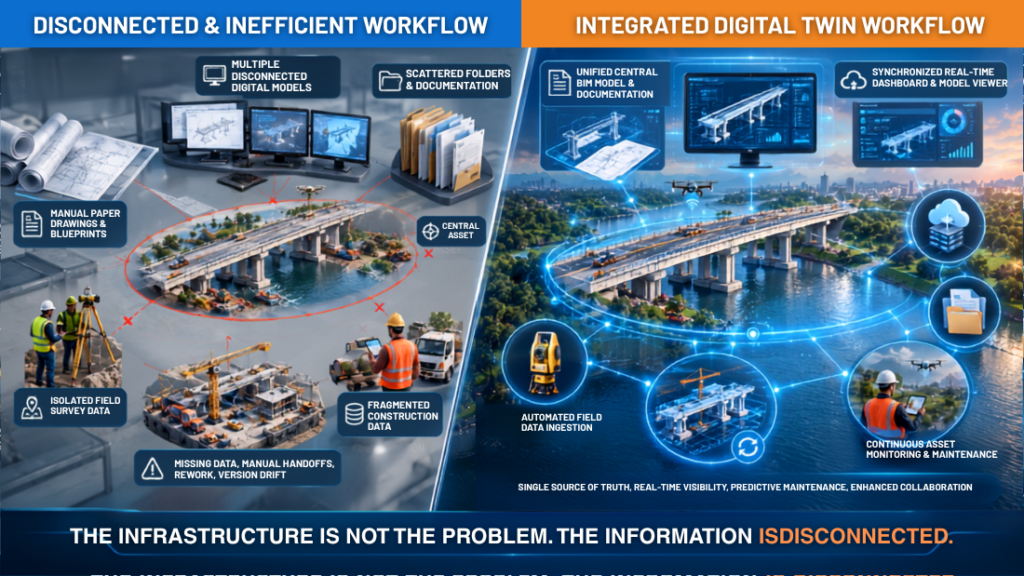
Conventional 2D CAD drawings were created for a single purpose; that is, to describe the geometry required for construction purposes. They were not created to store operational data of the asset once commissioned and transferred. There are some typical challenges associated with such drawings:
- Manual handoffs. Design teams' handover PDFs are as-built, construction teams update them by hand, and maintenance teams inherit whatever is left, often incomplete or out of date.
- No embedded asset data. A CAD line doesn't know it's a pipe, its material, its install date, or its maintenance schedule.
- Version drift. Multiple CAD files circulate across teams with no single source of truth, so "as-designed" rarely matches "as-built".
- Costly rework. Field crews frequently resurvey or re-verify conditions that should already be documented.
Where BIM Changes the Equation
Ontario’s Ministry of Transportation recently mapped this exact shift in its own BIM roadmap, contrasting manual PDF handoffs between design, construction, and maintenance against an automated handoff model that carries the same structured, real-time 3D data through every phase, from design to maintenance. That single change same data, same model, every phase is what separates infrastructure lifecycle management from simple project delivery.
CAD to BIM Conversion: The First Step Toward a Digital Twin
Before an organization can build a digital twin, it needs structured, intelligent 3D data to build it from. That’s where CAD to BIM conversion comes in the process of turning flat drawings, scanned documents, or point cloud captures into parametric, information-rich BIM models.
What CAD to BIM Conversion Actually Involves
CAD to BIM conversion isn’t a single step it typically combines a few related workflows depending on what source data is available:
- 2D to 3D conversion: Converting DWG, DXF, or DGN drawings into volumetric Revit or IFC-based models.
- Scan to BIM: Using laser scanning or LiDAR capture of an existing structure to generate an accurate point cloud, then modeling BIM elements directly on top of it.
- Point cloud to BIM: A related discipline focused specifically on translating raw scan data into usable, editable BIM geometry.
- As-built BIM: Reconciling design intent with actual field conditions so the final model reflects what was truly constructed, not just what was originally planned.
2D to 3D Conversion Workflow at a Glance
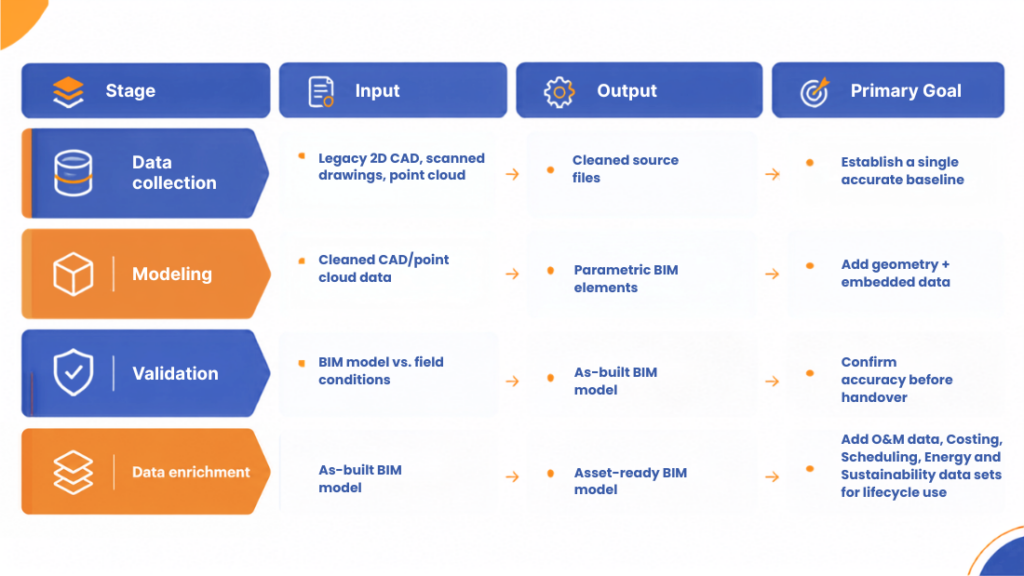
The output of this process isn’t just a nicer-looking 3D model it’s the structured data foundation that every later stage of infrastructure lifecycle management, including the digital twin itself, depends on.
Building Information Modeling as the Backbone of Asset Lifecycle Management
Once CAD to BIM conversion is complete, Building Information Modeling becomes the operating system for the rest of the asset’s life. This is where BIM stops being a design tool and starts functioning as an asset lifecycle management platform.
BIM Execution Plan Essentials
A BIM execution plan (BEP) outlines how data for models will be produced, exchanged, and managed throughout all stages of the project, as well as after completion. Such a BEP usually includes:
- Required Level of Development (LOD) for each discipline and phase
- Naming conventions and a shared Common Data Environment (CDE)
- What non-geometric asset data (COBie-style fields: manufacturer, install date, warranty, maintenance interval) must be embedded before handover
- Who owns and updates the model once operations begin
BIM Asset Management and Facility Management Software Integration
BIM asset management only delivers value once the model connects to the systems that actually run day-to-day operations. That means integrating BIM data with facility management software and computerized maintenance management systems (CMMS), so a single “digital asset record” not a folder of PDFs drives:
- Preventive and predictive maintenance scheduling
- Space and capacity planning
- Warranty and lifecycle-cost tracking
- Energy and performance monitoring
This integration is exactly what turns a BIM model from a design deliverable into infrastructure asset management infrastructure.
How Living Digital Twins Work Across the Infrastructure Lifecycle
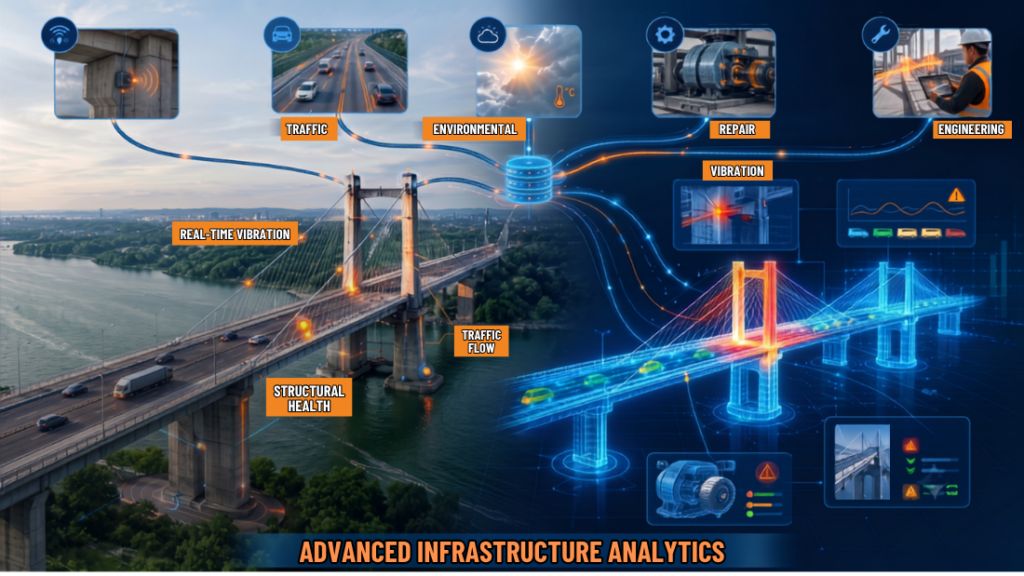
Digital twins take BIM a step further by being a dynamic digital model of the physical asset, which is connected to real-time sensor and performance data rather than static data at handover.
Construction Digital Twin vs. Static As-Built Models
The distinction lies in continuity. An as-built BIM model that is static is right as of the date of its delivery and becomes obsolete afterward. A construction digital twin, in its turn, keeps on receiving new information and stays relevant for the whole lifetime of the asset in question. This claim has been proved by recent studies conducted in the industry by United BIM: according to their results, 52% of AEC executives currently implement digital twins, the figure being close to 67% for those involved in operation.
Real-World Examples
Infrastructure owners are already proving out the model:
- On the Tianshan Shengli Tunnel project, Bentley Systems and Verdantix reported that a digital-twin-based handover offered clear advantages over simply transferring a static as-built model, enabling richer operational insight and continuity.
- On an 11-kilometre stretch of the A16 motorway in Rotterdam, teams achieved virtual commissioning before construction began by building a digital twin on top of BIM and 3D design data, reducing risk before ground was ever broken.
Infrastructure Digital Twin Value by Lifecycle Phase
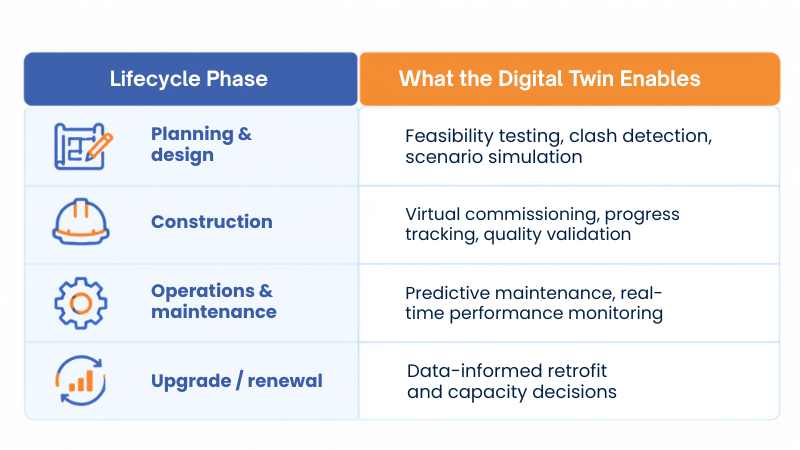
As Dr. Jennifer Schooling of Cambridge’s Centre for Smart Infrastructure and Construction has noted, the biggest benefits of BIM come not from design and delivery alone, but from using that information throughout the asset’s entire lifecycle which is precisely the gap a living digital twin is built to close.
BIM Modeling Services: In-House vs. Outsourced BIM Asset Management
The decision to create BIM-capable models from existing legacy 2D CAD data is often between developing internal capacity for BIM or hiring specialized BIM modeling services.
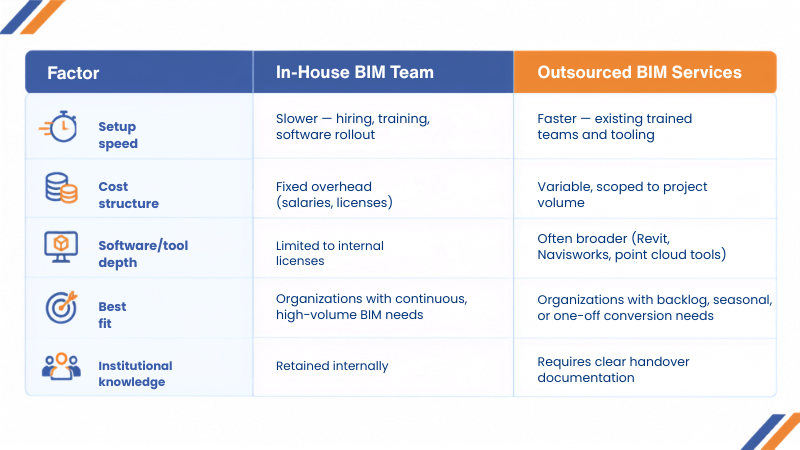
Many infrastructure owners land on a hybrid model: a small internal team that owns the BIM execution plan and data standards, paired with outsourced BIM modeling services for high-volume CAD to BIM conversion or scan-to-BIM capture work.
A Practical Roadmap: Building Lifecycle Management from CAD to Digital Twin
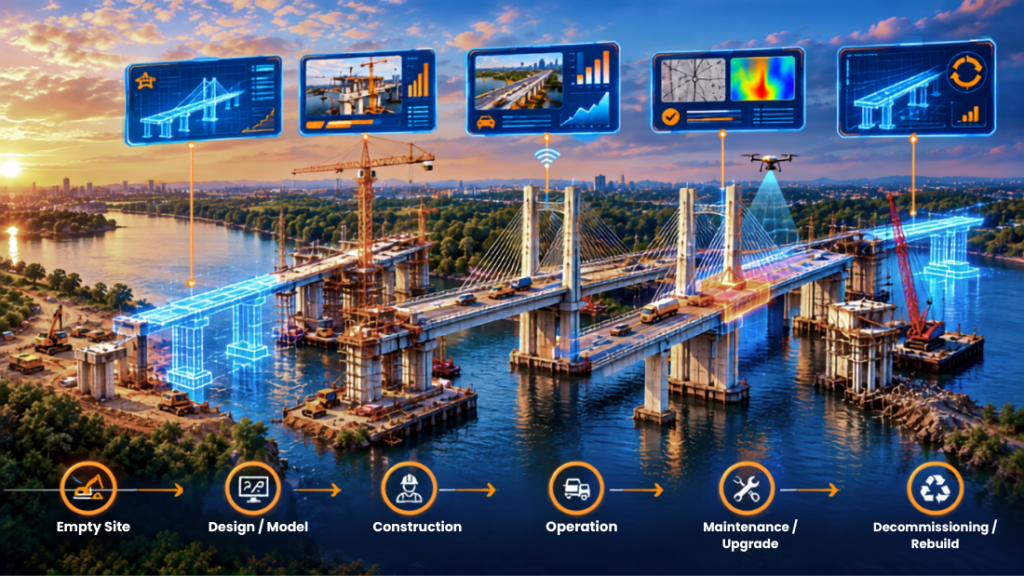
- Audit your CAD asset inventory. Identify which drawings are current, which are outdated, and which assets carry the highest operational risk if their data stays inaccurate.
- Prioritize by lifecycle value. Start CAD to BIM conversion with assets where maintenance cost, safety risk, or replacement value is highest, not simply the oldest files.
- Set your BIM execution plan and data standards first. Define LOD, naming conventions, and required asset data fields before modeling begins, so every converted asset is consistent.
- Convert and validate. Run 2D to 3D conversion or scan-to-BIM capture, then validate the resulting BIM model against field conditions to produce a true as-built BIM record.
- Connect BIM data to facility management software. Without this step, even a perfect BIM model stays a static file. Connection is what enables real BIM asset management.
- Layer in sensor and performance data. This is the step that converts a static BIM model into a genuine, living digital twin, and it can be introduced incrementally as the budget allows.
It is like what some transport organizations have been doing in their phased approach. For instance, the Ministry of Transportation in Ontario aims to integrate the digital twins into all contracts by 2034 in a stepwise manner, not in an instant switch-over.
Ready to Move Beyond Legacy CAD?
The modernization of infrastructure data need not necessarily imply an overhaul of all existing data. With Contragenix AEC Design & Support, engineers can get their CAD drawings and legacy data converted into a structured BIM model.
For all your CAD-to-BIM conversion, BIM modeling and asset data requirements, get in touch with Contragenix.
Conclusion
The management of infrastructure lifecycle is not a design phase issue anymore; it is a continuous process that starts with the conception of the asset until its demolition. Static 2D CAD drawings were never designed to manage such processes. The conversion from CAD to BIM, along with an effective implementation plan, and eventually digital twin provide owners, engineers, and facility managers one single live source of information instead of a bunch of old drawings. Companies which are now in the process of converting their high value-added assets instead of waiting for the perfect digital twin strategy are those who benefit from it now.
Scale Your AEC Projects with Expert Design Support
Whether you’re managing multiple projects or facing resource constraints, our experienced engineering professionals seamlessly integrate with your team to provide accurate design, drafting, BIM coordination, and technical documentation, keeping your projects on schedule and within budget.